Loading... ## 现有问题 当你在做一个视频站点的时候,你是否遇到下列痛点: - 服务器带宽不够,人一多就爆炸卡顿? - 原视频画质高,文件大,CDN拒绝缓存大文件,又不想压缩画质? - 对资源的访问没有保护,任何人都可以直接观看视频? 对于第三点鉴权,一般情况下,我们都是使用token的形式,因为浏览器访问视频资源的时候,是GET请求,如果需要鉴权,那么就需要在GET里带Query,类似:`https://example.com/test.mp4?token=xxx` 这种鉴权方式本来没有问题,但是一旦我们想要利用CDN的缓存机制来加速的时候,就出事了。 对于CDN来讲,当一个用户第一次访问这个资源的时候,他就会把这个资源缓存到边缘节点,当下一次访问的时候,就不会回源,就例如用户刚刚访问里上面那个视频,CDN就会把视频缓存到边缘节点,然后标注,这是路径`/test.mp4?token=xxx`的资源,下次不用回源。但是如果另一个用户也需要访问这个视频,他的token会和第一个用户不同,他的访问路径类似:`https://example.com/test.mp4?token=yyy` CDN会检查路径`/test.mp4?token=yyy`,但是他和`/test.mp4?token=xxx`是不同的,因为token不同。这样的话,CDN会认为没有命中缓存,继续回源,这就造成了带宽和流量的浪费,尤其是带宽小的情况下尤为严重,会导致其他用户的卡顿。 当然,在大部分主流CDN厂商的设置中,我们都可以设置忽略查询字符串来去掉后面的token部分来让第二个用户吃到缓存: 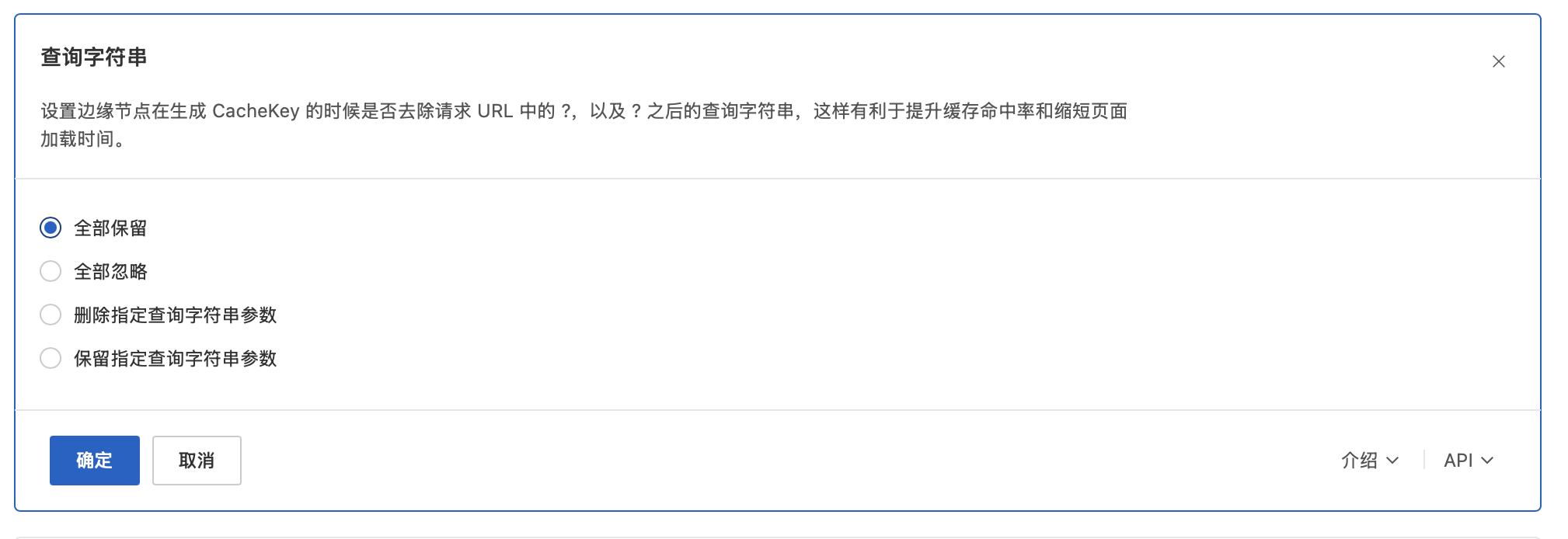  但是,这样也让鉴权失去了意义。如果去除掉查询字符串,任何一个人访问`/test.mp4`都将可以访问到这个视频,因为由于直接访问了,而且服务器端将收不到任何信息,这样就无法审计观看情况了。 那有没有什么好的解决方案呢?有的兄弟,有的,请继续往下看。 ## 视频分片 首先需要解决的是视频太大的问题,这个非常好解决,视频分片技术已经出现很久了,我们通过把一个大视频拆分成一个m3u8文件和多个ts文件,这样就可以让CDN缓存每一个ts文件,完美解决了CDN缓存的文件不能太大的问题。我们可以使用高性能的开源套件FFmpeg来快速、高效率的实现。 ### 1.安装FFmpeg FFmpeg可以很方便的使用包管理器安装: Ubuntu / Debian 系: ```bash sudo apt update sudo apt install ffmpeg ``` CentOS / RHEL / Fedora 系: ```bash sudo dnf install ffmpeg ``` 之后在控制台输入 `ffmpeg -version`可以看到如下界面,就说明成功了。  ### 2.安装显卡驱动(可选) 如果你的服务器有GPU,那么你可以利用GPU来进行转码,接下来是英特尔N150的核显+Debian的安装教程,其他品牌的应该类似。 执行命令: ```bash sudo apt update sudo apt full-upgrade -y sudo apt install -y \ linux-image-amd64 \ firmware-intel-graphics \ mesa-utils \ libgl1-mesa-dri \ mesa-vulkan-drivers \ vainfo \ intel-media-va-driver-non-free \ intel-gpu-tools sudo reboot ``` 安装完成后。输入 `lsmod | grep i915` (其他显卡需要把i915修改成对应的),显示如下则说明已经成功读取到显卡驱动了。 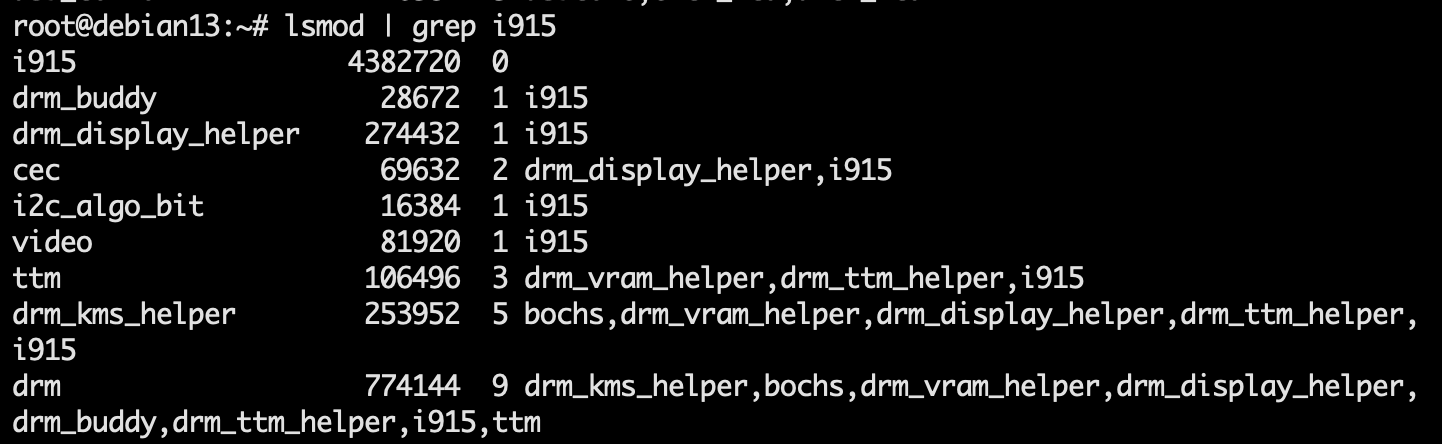 ### 3.转码测试 执行命令: ```bash ffmpeg \ -i input.mp4 \ -c:v libx264 \ -preset veryfast \ -crf 23 \ -threads 1 \ -c:a aac \ -b:a 128k \ -f hls \ -hls_time 10 \ -hls_list_size 0 \ -hls_segment_filename "output_hls/seg_%03d.ts" \ "output_hls/index.m3u8" ``` 输入的mp4文件和输出文件名需要根据真实情况修改,之后你应该在可以看到类似这样的目录结构: ``` output_hls/ ├── index.m3u8 ├── seg_000.ts ├── seg_001.ts ├── seg_002.ts └── ... ``` 那么恭喜你,ffmpeg转码正常 ### 4.代码实施 以下是一个完整的go语言代码,包含GPU加速失败回退、合法性校验等,最终输出一个HLS文件夹。 ```go package common import ( "encoding/json" "fmt" "log" "os" "os/exec" "path/filepath" "runtime" "strconv" "strings" "time" ) // 限制视频重型任务并发,避免多个 ffmpeg 同时跑满 CPU / GPU。 var videoTaskChan = make(chan struct{}, 1) type VideoInfo struct { Codec string PixFmt string Profile string Width int Height int Duration int HWCompatible bool } type ffprobeOutput struct { Streams []struct { CodecName string `json:"codec_name"` PixFmt string `json:"pix_fmt"` Profile string `json:"profile"` Width int `json:"width"` Height int `json:"height"` } `json:"streams"` Format struct { Duration string `json:"duration"` } `json:"format"` } // ProcessVideoToHLS 异步将视频转为 HLS。 func ProcessVideoToHLS(filePath string, resourceID uint) { go func() { videoTaskChan <- struct{}{} defer func() { <-videoTaskChan }() startedAt := time.Now() updateTranscodingStatus(resourceID, "processing") info, err := ProbeVideoInfo(filePath) if err != nil { failTranscoding(resourceID, "读取视频信息失败", err) return } logVideoInfo(resourceID, info) inputPath, playlistPath, segmentPattern, err := prepareHLSPaths(filePath) if err != nil { failTranscoding(resourceID, "创建 HLS 输出目录失败", err) return } cmd := buildFFmpegCommand(inputPath, playlistPath, segmentPattern, info.HWCompatible) if err := runCommand(cmd); err != nil { failTranscoding(resourceID, "视频转码失败", err) return } hlsURL, err := toAPIURL(playlistPath) if err != nil { failTranscoding(resourceID, "生成 HLS 访问路径失败", err) return } updateResource(resourceID, map[string]interface{}{ "transcoding_status": "completed", "hls_url": hlsURL, "duration": info.Duration, "estimated_time": info.Duration, }) removeOriginalFile(filePath, resourceID) logTranscodingResult(resourceID, info.Duration, startedAt) }() } // ProbeVideoInfo 使用 ffprobe 获取视频基础信息。 func ProbeVideoInfo(filePath string) (*VideoInfo, error) { cmd := exec.Command( "ffprobe", "-v", "error", "-select_streams", "v:0", "-show_entries", "stream=codec_name,pix_fmt,profile,width,height:format=duration", "-of", "json", filePath, ) output, err := cmd.CombinedOutput() if err != nil { return nil, fmt.Errorf("ffprobe 执行失败: %w, 输出: %s", err, output) } var probe ffprobeOutput if err := json.Unmarshal(output, &probe); err != nil { return nil, fmt.Errorf("解析 ffprobe 输出失败: %w", err) } if len(probe.Streams) == 0 { return nil, fmt.Errorf("未找到视频流") } stream := probe.Streams[0] info := &VideoInfo{ Codec: stream.CodecName, PixFmt: stream.PixFmt, Profile: stream.Profile, Width: stream.Width, Height: stream.Height, } if probe.Format.Duration != "" { duration, err := strconv.ParseFloat(probe.Format.Duration, 64) if err == nil { info.Duration = int(duration) } } info.HWCompatible = isVAAPICompatible(info) return info, nil } // isVAAPICompatible 判断当前视频是否适合走 Linux VA-API 硬件加速。 func isVAAPICompatible(info *VideoInfo) bool { if runtime.GOOS != "linux" { return false } // 常见低功耗设备对 10-bit 视频支持不稳定,保守起见走软解。 if strings.Contains(info.PixFmt, "10") || strings.Contains(info.Profile, "10") { return false } switch info.Codec { case "h264", "hevc": return true default: return false } } func prepareHLSPaths(filePath string) (inputPath, playlistPath, segmentPattern string, err error) { baseDir := filepath.Dir(filePath) fileName := strings.TrimSuffix(filepath.Base(filePath), filepath.Ext(filePath)) hlsDir := filepath.Join(baseDir, fileName+"_hls") if err := os.MkdirAll(hlsDir, 0755); err != nil { return "", "", "", err } inputPath, err = filepath.Abs(filePath) if err != nil { return "", "", "", err } playlistPath, err = filepath.Abs(filepath.Join(hlsDir, "index.m3u8")) if err != nil { return "", "", "", err } segmentPattern, err = filepath.Abs(filepath.Join(hlsDir, "seg_%03d.ts")) if err != nil { return "", "", "", err } return inputPath, playlistPath, segmentPattern, nil } func buildFFmpegCommand(inputPath, playlistPath, segmentPattern string, useVAAPI bool) *exec.Cmd { if useVAAPI { cmd := exec.Command( "ffmpeg", "-hide_banner", "-y", "-vaapi_device", "/dev/dri/renderD128", "-hwaccel", "vaapi", "-hwaccel_output_format", "vaapi", "-i", inputPath, "-c:v", "h264_vaapi", "-qp", "24", "-c:a", "aac", "-b:a", "128k", "-f", "hls", "-hls_time", "10", "-hls_list_size", "0", "-hls_segment_filename", segmentPattern, playlistPath, ) // Intel 核显常用 iHD 驱动。 cmd.Env = append(os.Environ(), "LIBVA_DRIVER_NAME=iHD") return cmd } return exec.Command( "ffmpeg", "-hide_banner", "-y", "-i", inputPath, "-c:v", "libx264", "-preset", "veryfast", "-crf", "23", "-threads", "1", "-c:a", "aac", "-b:a", "128k", "-f", "hls", "-hls_time", "10", "-hls_list_size", "0", "-hls_segment_filename", segmentPattern, playlistPath, ) } func runCommand(cmd *exec.Cmd) error { cmd.Stdout = log.Writer() cmd.Stderr = log.Writer() return cmd.Run() } func toAPIURL(playlistPath string) (string, error) { relPath, err := filepath.Rel(".", playlistPath) if err != nil { return "", err } return "/api/" + filepath.ToSlash(relPath), nil } func updateTranscodingStatus(resourceID uint, status string) { updateResource(resourceID, map[string]interface{}{ "transcoding_status": status, }) } func updateResource(resourceID uint, values map[string]interface{}) { if err := GetDB(). Model(&Resource{}). Where("id = ?", resourceID). Updates(values).Error; err != nil { log.Printf("[HLS] 更新资源失败: resourceID=%d, err=%v", resourceID, err) } } func failTranscoding(resourceID uint, message string, err error) { log.Printf("[HLS] %s: resourceID=%d, err=%v", message, resourceID, err) updateTranscodingStatus(resourceID, "failed") } func removeOriginalFile(filePath string, resourceID uint) { if err := os.Remove(filePath); err != nil { log.Printf("[HLS] 删除原始文件失败: resourceID=%d, err=%v", resourceID, err) return } log.Printf("[HLS] 已删除原始文件: resourceID=%d", resourceID) } func logVideoInfo(resourceID uint, info *VideoInfo) { acceleration := "CPU 软转码" if info.HWCompatible { acceleration = "VA-API 硬件转码" } log.Printf( "[HLS] 视频信息: resourceID=%d, codec=%s, pix_fmt=%s, profile=%s, size=%dx%d, duration=%ds, mode=%s", resourceID, info.Codec, info.PixFmt, info.Profile, info.Width, info.Height, info.Duration, acceleration, ) } func logTranscodingResult(resourceID uint, duration int, startedAt time.Time) { elapsed := time.Since(startedAt) if duration <= 0 { log.Printf("[HLS] 转码完成: resourceID=%d, elapsed=%.1f分钟", resourceID, elapsed.Minutes()) return } speed := float64(duration) / elapsed.Seconds() log.Printf( "[HLS] 转码完成: resourceID=%d, duration=%ds, elapsed=%.1f分钟, speed=%.2fx", resourceID, duration, elapsed.Minutes(), speed, ) } ``` ## 边缘鉴权 在服务器上将大视频转化为一个个小文件后,接下来就是要实现CDN加速+鉴权的操作。这里我们可以借助CDN边缘鉴权的方式,当用户要求访问一个视频的时候,只有在访问m3u8文件的时候,通过鉴权token向服务器发出请求,服务器接受后,返回一个每个用户都不一样的独特m3u8文件,带有可以被CDN边缘鉴权接受的Query参数。我们使用Type-A鉴权方法。其中,你需要替换下面的PrivateKey替换为自己的密码。 ### 1.本地代码编写 这段代码为每一个.ts文件生成一个可以被CDN边缘鉴权识别的鉴权参数。 ```go package common import ( "crypto/md5" "encoding/hex" "fmt" "math/rand" "os" "strconv" "strings" "time" ) // CDNSignConfig CDN签名配置 type CDNSignConfig struct { PrivateKey string // 签名密钥,与边缘函数中的privateKey一致 Expire int64 // 有效期(秒),默认3600秒 } // GetCDNSignConfig 获取CDN签名配置 func GetCDNSignConfig() CDNSignConfig { privateKey := os.Getenv("CDN_PRIVATE_KEY") if privateKey == "" { privateKey = "your_default_secret_key" // 默认密钥,生产环境必须配置 } return CDNSignConfig{ PrivateKey: privateKey, Expire: 14400, // 4小时有效期,确保长视频能完整播放 } } // GenerateCDNSignedURL 生成CDN签名URL (Type-A 鉴权,无 UID 绑定) // 格式: /path/to/resource?auth_key=timestamp-rand-signature // 签名算法: MD5(path-timestamp-rand-privateKey) func GenerateCDNSignedURL(resourcePath string, userID uint) string { config := GetCDNSignConfig() // 计算过期时间戳 timestamp := time.Now().Unix() + config.Expire // 生成随机数 randNum := rand.Int63() // 构建签名字符串: path-timestamp-rand-privateKey signString := fmt.Sprintf("%s-%d-%d-%s", resourcePath, timestamp, randNum, config.PrivateKey) // 计算MD5签名 hash := md5.Sum([]byte(signString)) signature := hex.EncodeToString(hash[:]) // 构建auth_key参数 authKey := fmt.Sprintf("%d-%d-%s", timestamp, randNum, signature) return fmt.Sprintf("%s?auth_key=%s", resourcePath, authKey) } // GenerateCDNSignedURLWithDomain 生成包含CDN域名的完整签名URL func GenerateCDNSignedURLWithDomain(resourcePath string, userID uint) string { cdnDomain := os.Getenv("CDN_DOMAIN") if cdnDomain == "" { // 如果没有配置CDN域名,返回相对路径 return GenerateCDNSignedURL(resourcePath, userID) } signedPath := GenerateCDNSignedURL(resourcePath, userID) return fmt.Sprintf("https://%s%s", cdnDomain, signedPath) } // VerifyLocalSign 验证本地 Type-A 签名 func VerifyLocalSign(resourcePath string, authKey string) (bool, uint) { config := GetCDNSignConfig() // 解析 authKey parts := strings.Split(authKey, "-") if len(parts) == 3 { timestampStr := parts[0] randNumStr := parts[1] signature := parts[2] timestamp, err := strconv.ParseInt(timestampStr, 10, 64) if err != nil || time.Now().Unix() > timestamp { return false, 0 } // 校验签名 signString := fmt.Sprintf("%s-%s-%s-%s", resourcePath, timestampStr, randNumStr, config.PrivateKey) hash := md5.Sum([]byte(signString)) if hex.EncodeToString(hash[:]) != signature { return false, 0 } return true, 0 } return false, 0 } func init() { rand.Seed(time.Now().UnixNano()) } ``` ### 2.CDN边缘节点代码编写 这里以阿里云ESA为例,其他CDN厂商一般也都支持边缘javascript代码执行。阿里云ESA的边缘函数一个月支持100万的调用,个人开发完全足够了。 进入阿里云ESA后台,点击“函数与Pages”,再点击“创建” <img src="https://img.yan-lin.cn/i/2026/06/27/6a3fd3b8f0947.png" alt="image-20260627214423876" style="zoom:67%;" style=""> 点击“函数模版”,“鉴权方式A”-创建 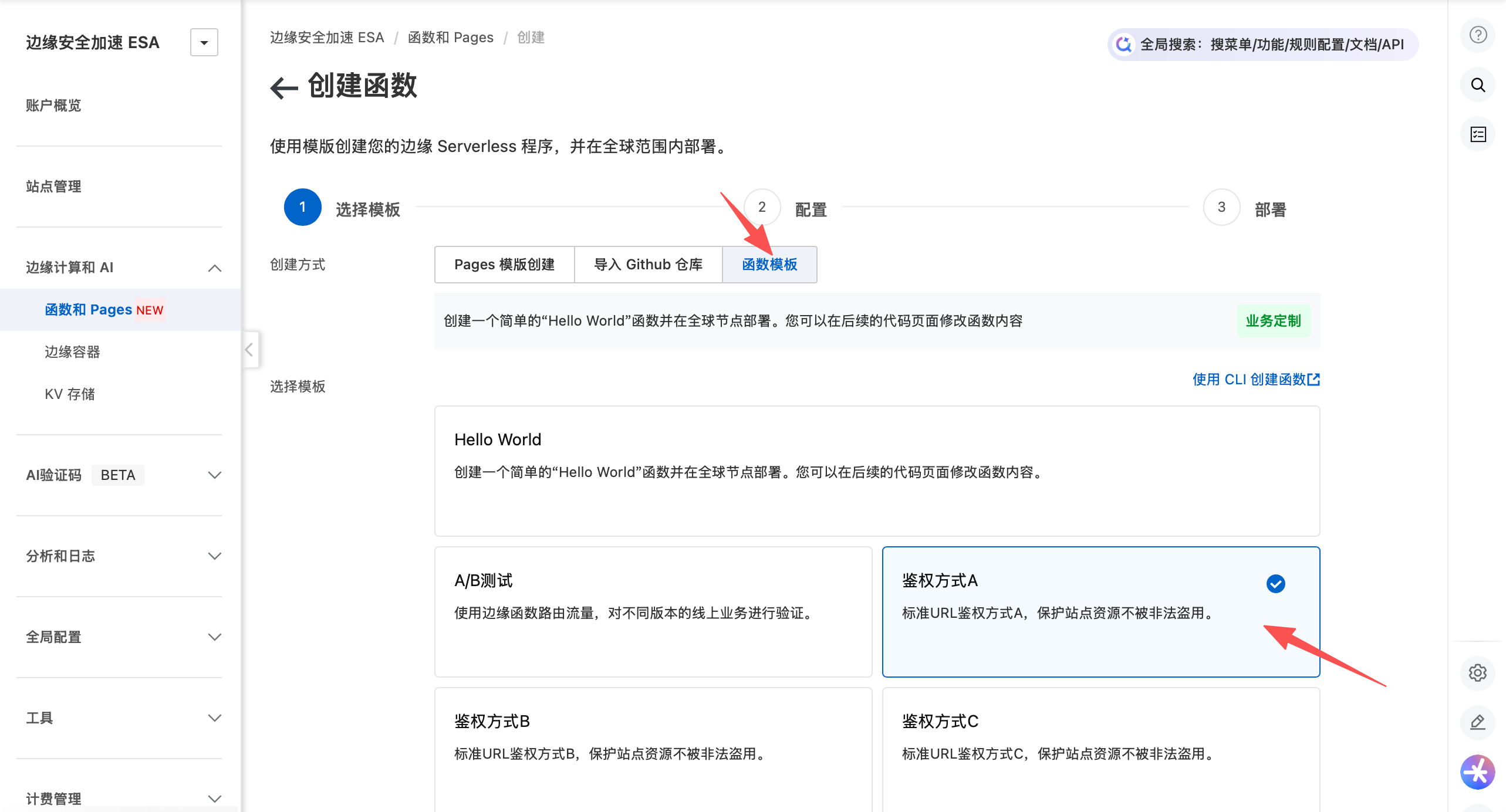 之后进入代码修改页面。修改privateKey成上面在后端设置的privateKey。 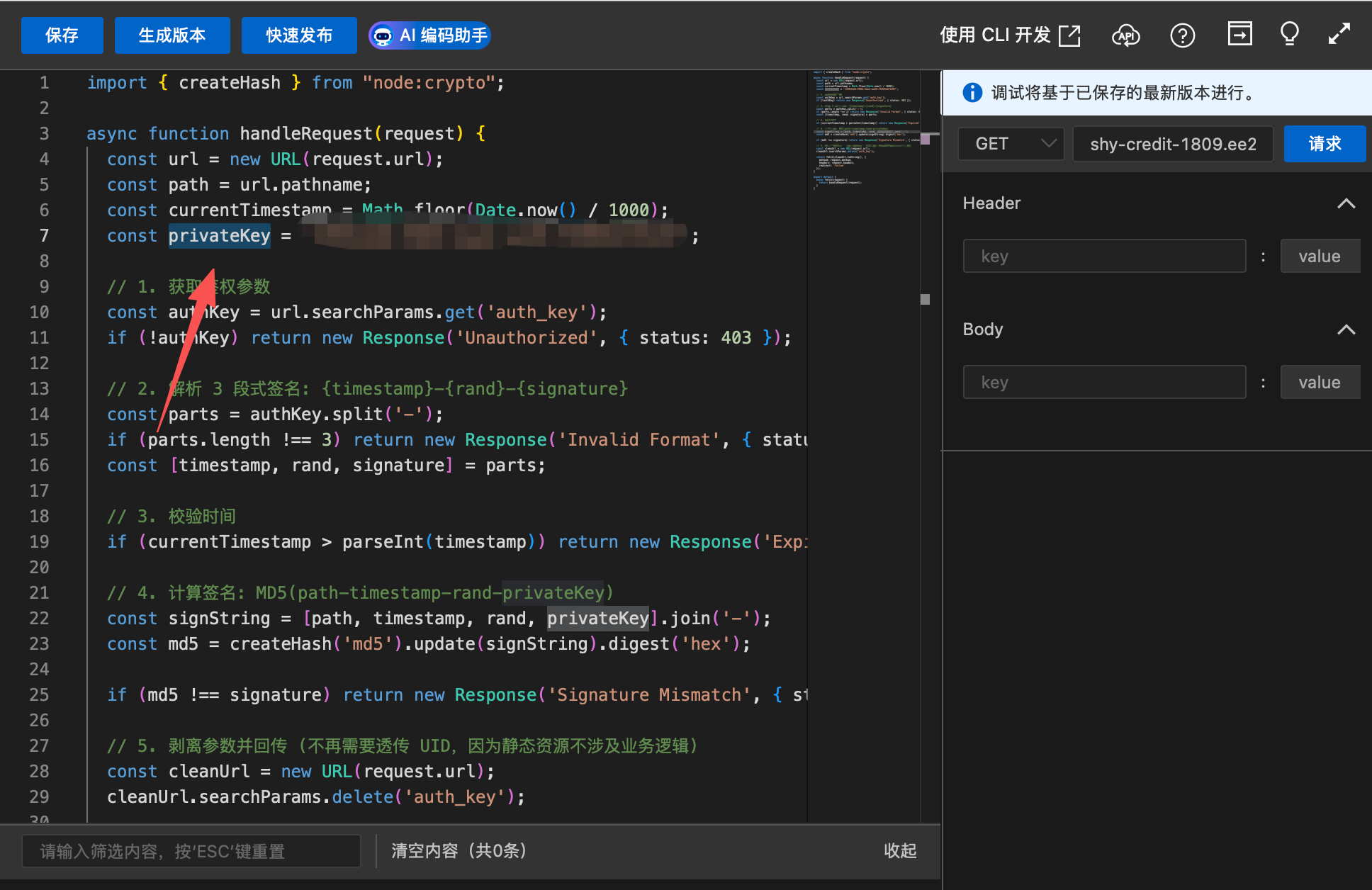 之后点击上方的“快速发布”即可成功发布。 ### 3.配置边缘CDN路由 在“路由”中,配置视频资源的路由,让视频资源触发这个边缘鉴权函数。 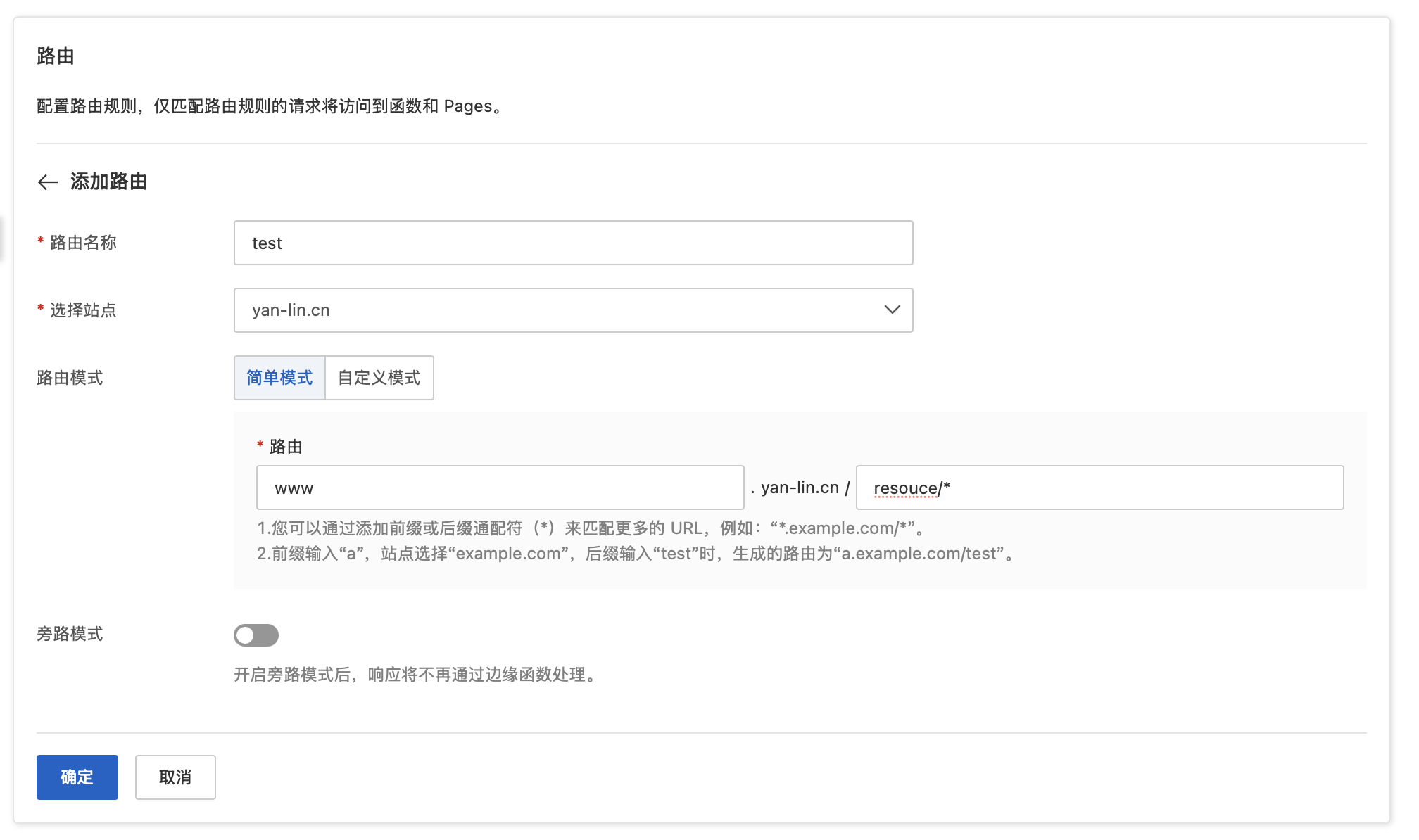 ## 缓存设置 在规则-缓存规则中,我们可以设置后缀为ts的文件,在节点边缘缓存中存储一年或更久。 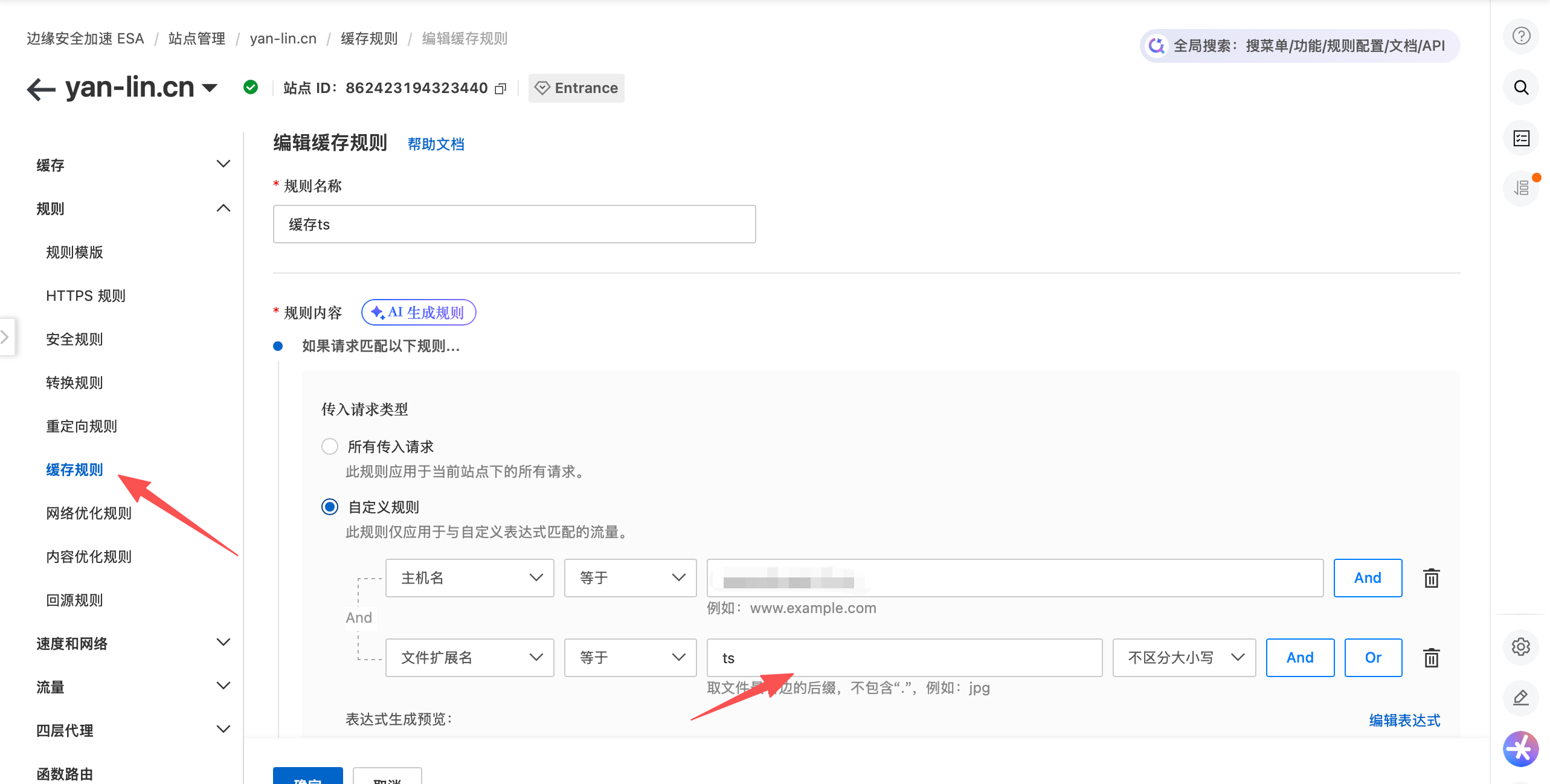 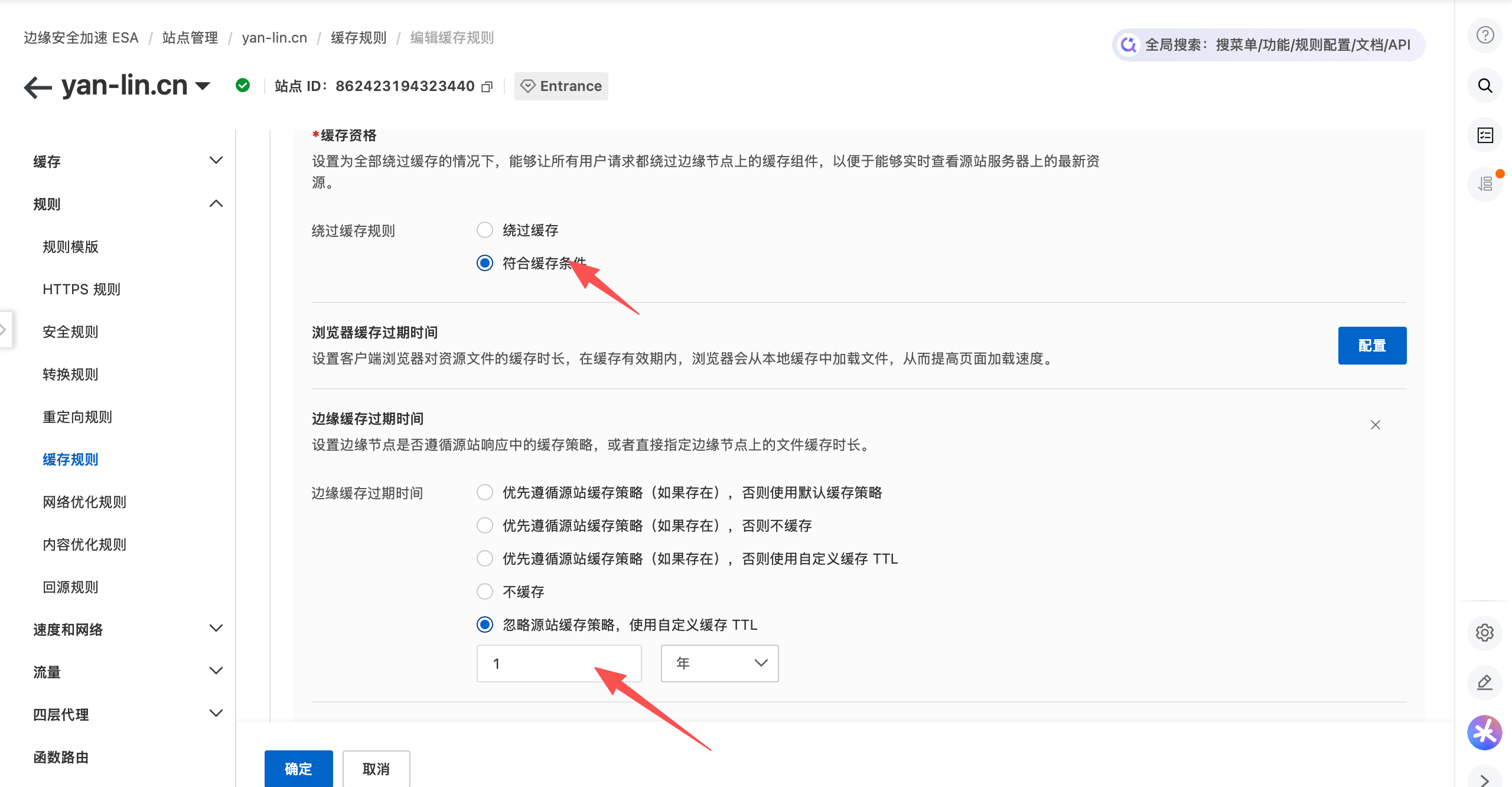 这样,我们就完美实现了CDN加速+鉴权,既可以留下观看视频的访问记录(访问m3u8时记录),也可以让资源不被他人随意获取。最重要的是,让无数个小的ts文件存储在边缘节点,大大降低了服务器的运行压力。本文以阿里云ESA为例,其他CDN厂家的配置思路类似。可自行探索 最后修改:2026 年 06 月 27 日 © 允许规范转载 赞 不用打赏哦!